mirror of
https://github.com/avinal/avinal.github.io.git
synced 2026-07-04 15:50:08 +05:30

212 lines
8.4 KiB
Markdown
212 lines
8.4 KiB
Markdown
---
|
|
title: How I implemented WakaTime embeddable Coding Graph GHA?
|
|
date: 2021-02-02 21:47
|
|
tags: [wakatime, github-action, coding]
|
|
category: development
|
|
image: https://raw.githubusercontent.com/avinal/Profile-Readme-WakaTime/b281d074ee75f9626b39d10e2e518c6a297208a3/waka.png
|
|
description: 'If you use WakaTime to track your coding activity. You can add that to
|
|
your README as a bar graph or embed it in your blog/portfolio. Just add this
|
|
action to any of your repositories and there you have it.'
|
|
---
|
|
|
|
# How I implemented WakaTime embeddable Coding Graph GHA?
|
|
|
|
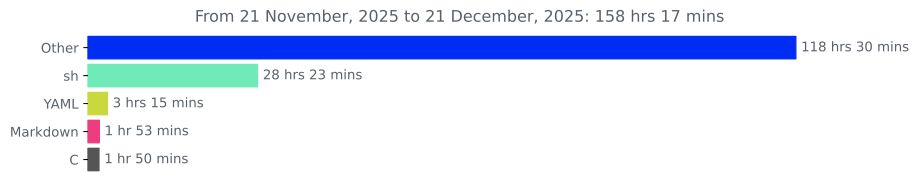
If you use WakaTime to track your coding activity. You can add that to
|
|
your README as a bar graph or embed it in your blog/portfolio. Just add this
|
|
action to any of your repositories and there you have it.
|
|
|
|
## Implementation Details
|
|
|
|
This GitHub Action is divided into three parts. I didn't want to use
|
|
Docker but it seems it doesn't work well without it. Let dive a little
|
|
into technical details. Three parts are as below.
|
|
|
|
1. [main.py](https://github.com/avinal/Profile-Readme-WakaTime/blob/master/main.py)
|
|
python script. This script contains many procedures.
|
|
|
|
- [Getting JSON data file via WakaTime
|
|
API](https://github.com/avinal/Profile-Readme-WakaTime/blob/master/main.py#L52)
|
|
|
|
```python
|
|
def get_stats() -> list:
|
|
...
|
|
return data_list
|
|
```
|
|
|
|
This function parses the JSON file received and scraps out the useful
|
|
data as a list of lists. Data scraped are language list, time spent on
|
|
each language, percentage of the time, start date, and end date. For
|
|
this action, I have limited the number of languages to 5 however it
|
|
should be very easy to increase that number.
|
|
|
|
- [Setting the
|
|
Timeline](https://github.com/avinal/Profile-Readme-WakaTime/blob/master/main.py#L13)
|
|
|
|
```python
|
|
def this_week(dates: list) -> str:
|
|
...
|
|
return f"Coding Activity During: {week_start.strftime('%d %B, %Y')} to {week_end.strftime('%d %B, %Y')}"
|
|
```
|
|
|
|
The start date and end date scraped in the last function are used here
|
|
to set the timeline. Because date in JSON is provided in UTC as below
|
|
:
|
|
|
|
```json
|
|
date: "YYYY-MM-DDTHH:MM:SSZ"
|
|
```
|
|
|
|
I striped it to simple dates only. We can set them manually by taking
|
|
the current time from the system. But that method is flawed. But this
|
|
method ensures that JSON was received latest and the request was
|
|
successful. Any anomaly will point to a failure in request.
|
|
|
|
- [Creating a bar
|
|
graph](https://github.com/avinal/Profile-Readme-WakaTime/blob/master/main.py#L21)
|
|
|
|
```python
|
|
def make_graph(data: list):
|
|
...
|
|
savefig(...)
|
|
```
|
|
|
|
Lastly, it is time to generate the graph and save them as an image.
|
|
This function uses the data scraped in the first step. Creating a bar
|
|
graph using matplotlib is easy.
|
|
Decorating was a bit difficult. I wanted this graph to merge with
|
|
GitHub's look so I chose to color the bar as GitHub colors the
|
|
languages. That data is stored as colors.json. Many of the languages have
|
|
slightly different spelling in GitHub as compared to WakaTime. So some
|
|
languages are shown in default color. That can be improved if we
|
|
notice that language and change its color manually. Lastly, the graph
|
|
is saved both as SVG and PNG. SVGs are better to put on a responsive
|
|
page.
|
|
|
|
2. [entrypoint.py](https://github.com/avinal/Profile-Readme-WakaTime/blob/master/entrypoint.sh)
|
|
shell script. This shell script clones the repository copies the
|
|
image and pushes changes to the master. There were several problems.
|
|
First of all authentication. This was solved by using a remote
|
|
repository address using GitHub Token. And it seems that GitHub
|
|
doesn't allow to commit without a username and email. So I used
|
|
**github-actions** bot email.
|
|
|
|
```bash
|
|
remote_repo-"https://${GITHUB_ACTOR}:${INPUT_GITHUB_TOKEN}@github.com/${GITHUB_REPOSITORY}.git"
|
|
git config user.email "41898282+github-actions[bot]@users.noreply.github.com"
|
|
git config user.name "GitHub Actions"
|
|
```
|
|
|
|
`41898282` is the id assigned to the github-actions bot. Don't ask
|
|
where I found them 🙂.
|
|
|
|
Another problem was to separate repository name from combined
|
|
*username/repository-name* provided by `${GITHUB_REPOSITORY}`. GitHub doesn't
|
|
provides a direct way to get just the repo name. We used *Internal
|
|
Field Separator*. It returns an array and works similar to `split()`
|
|
command in Python and Java.
|
|
|
|
```bash
|
|
# '/' is the seperator
|
|
IFS-'/' read -ra reponame <<< "${GITHUB_REPOSITORY}"
|
|
# returned {username, repository}
|
|
repository-"${reponame[1]}"
|
|
```
|
|
|
|
After that, all other commands are pretty straight. Commit the added
|
|
files and push them.
|
|
|
|
3. [Dockerfile](https://github.com/avinal/Profile-Readme-WakaTime/blob/master/Dockerfile)
|
|
**IMPORTANT** It took a lot of time to reach this state 🥱. This is
|
|
where all the magic happens. I am running <span
|
|
class="title-ref">ubuntu:latest</span> inside the container. I first
|
|
update the distribution. Then install the required python packages.
|
|
Lastly, I invoke the python script and shell script.
|
|
|
|
There was an almost impossible problem, I searched hundreds of posts
|
|
that *how can I access the generated files inside Docker container*, but
|
|
no luck. But at last, I found a workaround(obviously otherwise you
|
|
wouldn't be reading this by now 🤣) each command is run in a separate
|
|
virtual sub-container. As the command ends its output is also lost but
|
|
not when you club multiple commands together. At least not until every
|
|
command is finished. The generated files are available to the next
|
|
clubbed process. I did that by combining the python script run and shell
|
|
script run.
|
|
|
|
```dockerfile
|
|
CMD python3 /main.py && /entrypoint.sh
|
|
```
|
|
|
|
This part is the smallest yet took the most time and tries while
|
|
developing this action.
|
|
|
|
## How to use this GitHub Actions?
|
|
|
|
1. First get your WakaTime API Key. You can get it from your
|
|
[WakaTime](<https://wakatime.com>) account settings.
|
|
|
|
2. Save WakaTime API Key to Repository Secret. Find that by clicking
|
|
the Settings tab. Keep the name of the secret as
|
|
**WAKATIME_API_KEY**.
|
|
|
|
3. Add the following line in your README.md of your repo.
|
|
|
|
```html
|
|
<img src="https://github.com/<username>/<repository-name>/blob/<branch-name>/images/stat.svg" alt="Alternative Text"/>
|
|
Example: <img src="https://github.com/avinal/avinal/blob/main/images/stat.svg" alt="Avinal WakaTime Activity"/>
|
|
```
|
|
|
|
> You can use this method to embed in web pages too. **Do not use the
|
|
> markdown method of inserting images. It does not work sometimes.**
|
|
|
|
4. Click the **Action** tab and **choose to set up a workflow
|
|
yourself**.
|
|
|
|
5. Copy the following code into the opened file, you can search for
|
|
**WakaTime Stat** in the marketplace tab for assistance.
|
|
|
|
```yaml
|
|
name: WakaTime status update
|
|
|
|
on:
|
|
schedule:
|
|
# Runs at 12 am '0 0 * * *' UTC
|
|
- cron: "1 0 * * *"
|
|
|
|
jobs:
|
|
update-readme:
|
|
name: Update the WakaTime Stat
|
|
runs-on: ubuntu-latest
|
|
steps:
|
|
# Use avinal/Profile-Readme-WakaTime@<latest-release-tag> for latest stable release
|
|
# Do not change the line below except the word master with tag number maybe
|
|
# If you have forked this project you can use <username>/Profile-Readme-WakaTime@master instead
|
|
- uses: avinal/Profile-Readme-WakaTime@master
|
|
with:
|
|
# WakaTime API key stored in secrets, do not directly paste it here
|
|
WAKATIME_API_KEY: ${{ secrets.WAKATIME_API_KEY }}
|
|
# Automatic github token
|
|
GITHUB_TOKEN: ${{ github.token }}
|
|
# Branch - newer GitHub repositories have "main" as default branch, change to main in that case, default is master
|
|
BRANCH: "master"
|
|
# Manual Commit messages - write your own messages here
|
|
COMMIT_MSG: "Automated Coding Activity Update :alien:"
|
|
```
|
|
|
|
6. Please wait till 12 AM UTC to run this workflow automatically. Or
|
|
you can force run it by going to the Actions tab. Or you can add the
|
|
following lines under `on:` to run with
|
|
every push. Search for 12 AM UTC to find the equivalent time in your
|
|
time zone.
|
|
|
|
```yaml
|
|
on:
|
|
push:
|
|
branches: [ master ]
|
|
schedule:
|
|
- cron: '1 0 * * *'
|
|
```
|
|
|
|
## My Coding Activity
|
|
|
|
|